Praxis alpha.49. A more connected way to build.
More control over every step. Better prototypes, clearer reviews, and verification backed by evidence.
- Published
- Version
- 0.1.0-alpha.49
- License
- Apache-2.0
- Marketplace
- dfg-inc/praxis-marketplace
The launch film
Film description and on-screen text
A 54-second film with an original soundtrack and no voice-over: everything it says is on screen.
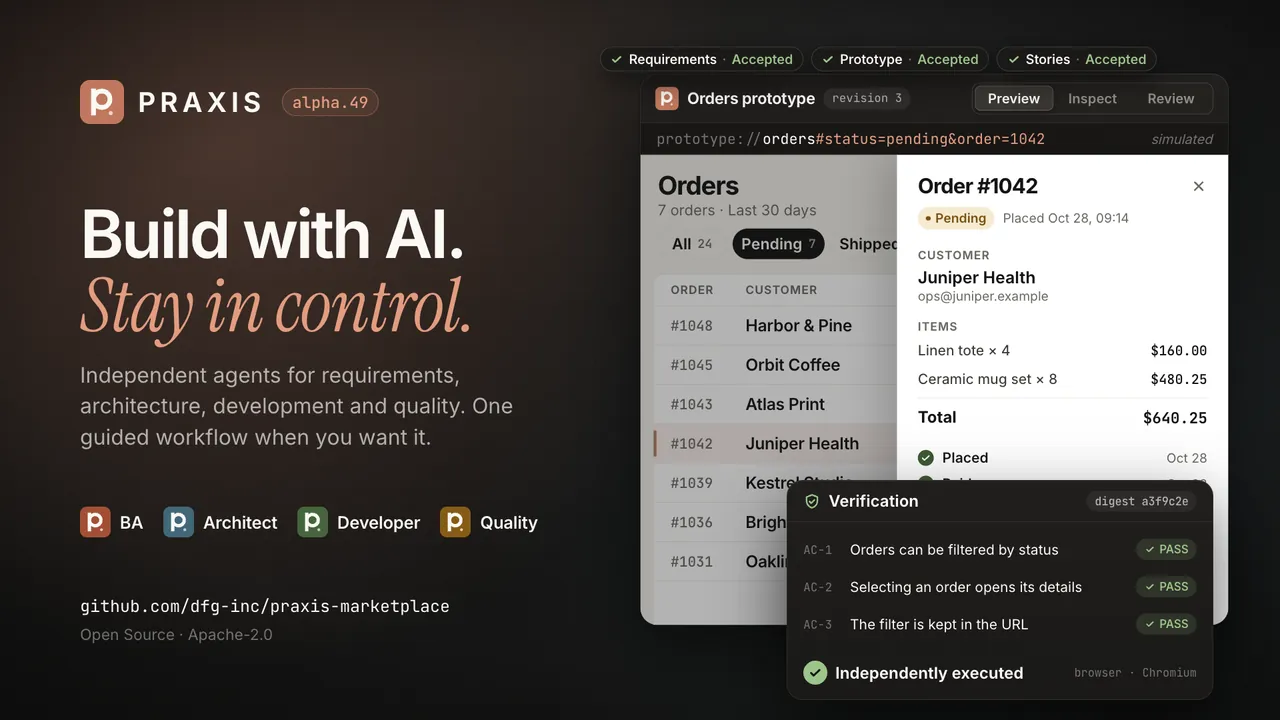
Described. The Praxis logo and “alpha.49 is here” open the film. Four role cards (Business Analyst, Architect, Developer and Quality) first appear as standalone plugins, then connect over a shared Runtime. A guided workflow accepts six phases. A prototype of an orders dashboard is filtered, opened, inspected and accepted. An agent’s “Tests passed” is stamped “Not evidence”, and a Chromium check passes four acceptance criteria. A work item spans three repositories and is resumed in a new session. The film ends on the Praxis logo, the tagline and the marketplace address.
On-screen text. Praxis. alpha.49 is here. AI development. With control. — Use one role. Each role installs and works on its own. — Or connect them all. Independent agents. One connected workflow. — From idea to delivery. With clarity. A guided workflow, when you want one. — Experience it before you build it. Preview, Inspect, Review. Accept this prototype. — Don’t just trust the result. Verify it. Agent says: Tests passed. Not evidence. Executed evidence: 4 of 4 criteria verified. Bound to this build. Stale if it changes. — Keep context. Across sessions and repositories. Resumed: Order status filter. — Praxis 0.1.0-alpha.49. Build with AI. Stay in control. Open Source · Apache-2.0. Explore Praxis. github.com/dfg-inc/praxis-marketplace
The orders data in the film is fictitious.
01 Roles & workflow
Use one role. Or connect them all.
Business Analyst, Architect, Developer and Quality are separate plugins. Install the one you need and it brings Praxis Runtime, the local MCP server every role uses. Nothing requires the other roles or the full workflow.
When you want the roles to work together, the Guided Workflow connects them. Requirements Review, Prototype, Story Plan and Stories Review are explicit gates that later phases cannot skip: accepted requirements feed the prototype, agreed stories feed architecture and implementation, and Quality checks the result against the criteria you accepted.


- Business AnalystRequirements, user stories and specifications.
- ArchitectDecisions, service design and contracts.
- DeveloperImplementation and delivery.
- QualityVerification and evidence.
02 Prototypes
Experience it before you build it.
In a guided work item the prototype comes before the stories. It is one HTML page built from the accepted requirements, with filters, tables, forms, drawers, modals, navigation, mock datasets and simulated URL state.
The page has three modes. Preview to use it as a person would. Inspect to see the components behind each part. Review to comment and accept it. Feedback and changes are saved as revisions of the prototype.


Frames from the launch film. The orders data is fictitious.
03 Reviews
Requirements and stories, reviewed item by item.
Reviews happen on HTML pages, not in JSON or in the chat. Each page records a decision per item and saves it back through the Runtime. Accepting is your decision: the Runtime refuses acceptance commands sent by the agent and takes them from the review page.
AC-1Orders can be filtered by statusAcceptedAC-2Selecting an order opens its detailsAcceptedAC-3The filter is kept in the URLRejectedAC-4Totals match the order linesNo decision yet
- 01One decision per criterionAccept or reject each acceptance criterion, edit, remove or add one, and leave a comment.
- 02Saved where the work livesSave writes the decisions back through the Runtime; nothing has to be pasted into the chat.
- 03Stale when it changesStaleness is tracked per item, so a revised requirement marks the decisions that depended on it.
- 04Story Plan firstA short plan of what will be built, what the user gets, which data and prototype parts it uses, and which requirements and criteria it covers.
- 05Stories ReviewReview stories one by one; edit, exclude or restore them on the page, and split or merge them through the workflow.
04 Context
Continue the work. Not the chat.
Praxis keeps the state of the work, not a transcript of the conversation. A work item records its phase, requirements, decisions and next step locally, in your project.
Open a new session and ask to continue: praxis_session_start returns the work item, its phase, the decisions made and what comes next. The earlier conversation itself is not restored; the structured state is, and Praxis says so.

05 Repositories
One work item. Several repositories.
Register the repositories a change touches, such as a web app, a mobile app and an API, in one work item. Praxis records the services, which one depends on which, and the contracts between them.
Each repository gets its own brief and progress, and the implementation order follows the dependencies. A repository counts as entered only when a current implementation record exists for one of its services.
Work item · Order status filter
- orders-api
- web-app
- mobile-app
06 Quality
Don’t just trust the result. Verify it.
An agent saying the tests passed is a claim. Quality counts a criterion as PASS only with a current, independently executed result: a check it ran, or a browser run in a Praxis-owned Chromium driver. Agent statements are shown as attested, never as PASS.
Browser evidence is bound to the build it ran against and goes stale when that build changes.
Agent says
“Tests passed.”
Not evidenceRecorded as attested. It never counts as PASS.

- PASSA current, independently executed result for this build.
- BLOCKEDThe check could not run, for example without the browser setup; the reason is recorded, and it never becomes PASS.
- AttestedWhat an agent says it did; shown for context, never counted as PASS.
07 Runtime
A stronger Runtime. Nothing you rely on removed.
52 → 61 MCP tools61
MCP toolsNine tools added; none of the alpha.48 tools was renamed or removed, and their schemas stay backward compatible.
- Approval provenanceEvery verified approval records the action, the subject’s revision and fingerprint, the channel and the trust level. Approvals recorded before alpha.49 stay marked as unverified provenance.
- Stricter boundariesReview pages save only with a per-load token and an Origin check; a repository’s
.envcan set onlyPRAXIS_keys; instruction files found in analysed repositories are listed, not followed. - Compatible with alpha.48Alpha.48 work items are read as they are. The first write migrates them and keeps the original as
<id>.json.v1.0.0.bak. - Apache-2.0Every repository, plugin and archive carries
LICENSEandNOTICE.
08 Install
Install it in two commands. Or just one role.
Without a terminal
In Claude: Customize → Plugins → Add → Add marketplace → dfg-inc/praxis-marketplace → Praxis → Add. Adding Praxis installs the Runtime and all four roles.
Full set, from a terminal
claude plugin marketplace add dfg-inc/praxis-marketplace
claude plugin install praxis@praxis
One role
Each role installs on its own and brings Praxis Runtime with it.
claude plugin install praxis-ba@praxisclaude plugin install praxis-architect@praxisclaude plugin install praxis-developer@praxisclaude plugin install praxis-quality@praxisUpgrading from alpha.48
Update the marketplace, then each Praxis plugin you have installed (for example praxis-runtime and praxis-ba). Restart Claude, call praxis_doctor and check that build.version is 0.1.0-alpha.49.
claude plugin marketplace update praxis
claude plugin update <name>@praxis
Claude Desktop Chat does not take the Runtime from a plugin: install the new praxis-runtime.mcpb from the Runtime release over the old one and restart.
09 Limitations
Known limitations
This is an alpha pre-release. What was verified, and what was not:
- PlatformsVerified on macOS on Apple silicon (Node 24, Chrome 156). Linux and Windows are not verified.
- Approval dialogsA person’s Approve in the client dialog was observed in Claude Code only. The Claude Desktop approval dialogs (Code and Chat) are not verified for this build, and neither is a person’s Reject in the Claude Code dialog.
- JiraLive Jira is not verified for this build. Local work does not need Jira.
- Who approved
independent-humanmeans the client returned Approve to its own dialog; it does not identify the person. - Quality runs project codeAdapters and checks run as your OS user, with no OS sandbox. Run Quality only on projects you trust.
- Browser checksNeed a one-time setup with
node tools/scripts/setup-quality-browser.mjsin praxis-runtime. - MigrationOne way: the first write moves an alpha.48 work item to the new format. The original stays next to it as a backup.
Details are in the release documents and the Marketplace release notes. For setup and daily use, read the documentation.
Praxis alpha.49
Ready to build with more control?
Add the marketplace in Claude, install Praxis or a single role, and try it on a real project. Tell us where it breaks.